
Structural MRI Processing Pipeline (2)
 GitHub
  YouTube
  QC Sample
 A lightweight, end‑to‑end pipeline for brain extraction, registration to MNI, post‑processing (N4 + masked Z‑score + cropping), QC visualization, and CSV metadata generation.
Prerequisites → Configuration → Processing Steps (numbered) → Quick Start → Outputs/QC → Authors/Version.
Prerequisites
- Python ≥ 3.8
- Python packages:
numpy,nibabel,SimpleITK,matplotlib,tqdm,templateflow,pandas - SynthStrip via one of:
- Singularity image:
freesurfer/synthstrip:latest(recommended) - Docker image:
freesurfer/synthstrip:latest - FreeSurfer installation with
mri_synthstripin$FREESURFER_HOME/bin
- Singularity image:
- (Optional) TemplateFlow cache (auto‑downloads
MNI152NLin2009cAsymtemplate) - (Optional) conda for environment management
Example env setup
conda create -y -n smri python=3.10
conda activate smri
pip install numpy nibabel SimpleITK matplotlib tqdm templateflow pandas
Configuration
Paths and behavior are controlled by config.py (shared by all scripts). The scripts are primarily config‑driven; minimal CLI flags are provided for convenience.
Key items in config.py:
- Paths:
INPUT_DIR,OUTPUT_DIR,STAGE_ROOTS - Unified structure pattern:
STRUCTURE = "{root}/{subject}/{session}" - Patterns:
SKULLSTRIP_T1_FILE_PATTERN,SKULLSTRIP_T2_FILE_PATTERN - Processing:
MODALITIES,SUBJECTS,SESSIONS,FORCE_REPROCESSING - QC thresholds, logging, CPU threads
- Registration:
MNI_TEMPLATE_VERSION,MNI_TEMPLATE_RESOLUTION - Post‑process:
POSTPROCESS_APPLY_N4,POSTPROCESS_CROP_MARGIN - CSV metadata: output dir, columns, demographics encoders
Processing Steps
0) Convert DICOM to Nifti, dicom_to_nifti.py
If your dataset is already in NIfTI, skip this step. Otherwise, this script converts DICOM folders into NIfTI (gzip-compressed, BIDS-style layout) using dcm2niix.
Inputs
-
DICOM series or root directory
Outputs
-
{subject}/{session}/anat/*.nii.gz(+ JSON sidecars)
CLI
python dicom_to_nifti.py --dicom_dir /path/to/DICOM --output_dir /path/to/nifti --subject sub-0001 --session ses-01
Reference: Li, X., Morgan, P.S., Ashburner, J., Smith, J., & Rorden, C. (2016). The first step for neuroimaging data analysis: DICOM to NIfTI conversion. Journal of Neuroscience Methods, 264, 47–56.
https://www.sciencedirect.com/science/article/pii/S0165027016300073
1) Brain Extraction, skullstrip.py
Removes non‑brain tissue using SynthStrip. The script tries Singularity → Docker → FreeSurfer binary (in this order). Generates brain, mask, and QC images.

Inputs
- NIfTI files discovered via
STRUCTUREand patterns:*acq-MPRAGE_T1w.nii.gz*acq-CUBE_T2w.nii.gz
Outputs (per subject/session in STAGE_ROOTS["skullstrip"])
*_brain.nii.gz,*_brain_mask.nii.gz*_desc-qc.pngoverlay montage- Global CSV:
QC/qc_summary.csvwith brain volume (ml) and PASS/FAIL
CLI
python skullstrip.py # process all
python skullstrip.py --subject sub-ON12345
Reference: Hoopes, A., Mora, J.S., Dalca, A.V., Fischl, B., & Hoffmann, M. (2022). SynthStrip: Skull-Stripping for Any Brain Image. NeuroImage, 260, 119474.
https://doi.org/10.1016/j.neuroimage.2022.119474
2) Registration to MNI (Rigid → Affine), reg.py
Registers T1w to MNI152NLin2009cAsym (1mm) using SimpleITK (Mattes MI; multi‑resolution). Applies the same transforms to T2w of the same session.
Method
- Rigid: Euler3D, shrink [4,2,1], linear
- Affine: 12‑DOF, shrink [2,1], linear
- Final resampling: composite transform (rigid+affine) for single interpolation
- Saves
*.mattransforms
Outputs (per subject/session in STAGE_ROOTS["registration"])
*_mni_rigid_warped.nii.gz(QC/ref)*_mni_warped.nii.gz(final)other/*_rigid.mat,other/*_affine.mat
CLI
python reg.py
python reg.py --subject sub-ON12345
Reference: Lowekamp, B.C., Chen, D.T., Ibáñez, L., & Blezek, D. (2013). The Design of SimpleITK. Frontiers in Neuroinformatics, 7, 45. https://doi.org/10.3389/fninf.2013.00045
3) Post‑processing, postprocess_mni_mask_zscore_crop.py
Warp masks to MNI, run N4 bias correction (optional), compute masked Z‑score, crop around the brain, and save a multi‑slice visualization.

Steps
- Warp native masks → MNI with nearest‑neighbor using composite transform (rigid+affine)
- N4 bias correction (if
POSTPROCESS_APPLY_N4 = True) - Masked Z‑score: μ/σ computed within mask; background kept at 0
- Crop: tight bounding box (+
POSTPROCESS_CROP_MARGIN), affine updated (qform/sform set) - Save multi‑slice PNG montage
Outputs (per subject/session; under the same registration anat/)
T1w_mni_mask.nii.gzT1w_mni_warped_n4.nii.gz(if N4 enabled)T1w_mni_zscore_fixed.nii.gzT1w_mni_zscore_fixed_cropped.nii.gzmultislice_visualization_<subj>.png- (T2 equivalents when available; falls back to T1 mask if T2 mask missing)
CLI
python postprocess_mni_mask_zscore_crop.py
python postprocess_mni_mask_zscore_crop.py --subject sub-ON12345
Reference: Tustison, N.J., Avants, B.B., Cook, P.A., Zheng, Y., Egan, A., Yushkevich, P.A., & Gee, J.C. (2010). N4ITK: Improved N3 bias correction. IEEE Transactions on Medical Imaging, 29(6), 1310–1320.
https://doi.org/10.1109/TMI.2010.2046908
4) Quality Control & Reports, skullstrip.py, structural_qc.py
skullstrip.pywrites per‑subject QC montages and a global QC CSV with brain volume.structural_qc.py(optional helpers) can be used for extended validations (e.g., Dice vs reference).


Outputs
QC/qc_summary.csv(columns: input_file, output_file, modality, qc_status, brain_volume_ml, qc_image_path, error_message)
5) CSV Metadata, generate_csv_metadata.py
Scans registration outputs and builds CSVs listing MNI warped, Z‑score, and cropped paths, with optional demographics (participants.tsv) and encodings (sex, handedness).
Outputs
metadata/T1_metadata.csvmetadata/T2_metadata.csv
CLI
python generate_csv_metadata.py
Quick Start
# 0) (optional) create environment
conda create -y -n smri python=3.10
conda activate smri
pip install numpy nibabel SimpleITK matplotlib tqdm templateflow pandas
# 1) configure
# edit config.py (private paths, thresholds)
# 2) brain extraction
python skullstrip.py
# 3) registration
python reg.py
# 4) post-process
python postprocess_mni_mask_zscore_crop.py
# 5) metadata tables
python generate_csv_metadata.py
Outputs (Where to Find Things)
-
Skullstrip →
STAGE_ROOTS["skullstrip"]*_brain.nii.gz,*_brain_mask.nii.gz,*_desc-qc.png, globalQC/qc_summary.csv -
Registration →
STAGE_ROOTS["registration"]*_mni_rigid_warped.nii.gz,*_mni_warped.nii.gz,other/*_rigid.mat,other/*_affine.mat -
Post‑process → same
anat/underregistrationT1w_mni_mask.nii.gz,T1w_mni_zscore_fixed.nii.gz,T1w_mni_zscore_fixed_cropped.nii.gz,multislice_visualization_<subj>.png(and T2 analogs) -
CSV metadata →
CSV_METADATA_DIRT1_metadata.csv,T2_metadata.csv
Authors / Version
- Author: Mohammad H. Abbasi (mabbasi [at] stanford.edu)
- Lab: Stanford University, STAI Lab (https://stai.stanford.edu)
- Created: 2025 | Version: 1.0.0 | Last update: 10 Sep, 2025
Acknowledgements
Thanks to the open‑source neuroimaging community (FreeSurfer, TemplateFlow, SimpleITK, nibabel) and dataset providers.
Mind Data HubFunctional MRI Pre-Processing Pipeline
 Wiki
Wiki 
| Prerequisites → Configuration → Processing Pipeline → Quick Start → Resource Examples → Output Structure → Command Reference → Troubleshooting → References → Authors/Version/Cite |
The fMRI Pre-Processing Pipeline is a lightweight, end-to-end workflow built around fMRIPrep. FMRIPrep handles motion/distortion correction, anatomical/functional alignment to standard spaces, surface mapping, confound modeling, and we added connectivity analysis, with clear QC visualizations considering QC on the number of volumes (Adjustable), FD, high-motion ratio; QC with visual connectivity matrices; and tabular outputs for downstream ML/AI.
Prerequisites
- Python ≥ 3.8
- Singularity/Apptainer for containerized execution
- Python packages:
numpy,pandas,nilearn,nibabel,tqdm - fMRIPrep Singularity image:
fmriprep_latest.sif(auto-downloaded) - FreeSurfer license: Valid license file
- (Optional) GPU support with CUDA drivers
- (Optional) conda for environment management
Example Environment Setup
conda create -y -n fmri python=3.10
conda activate fmri
pip install numpy pandas nilearn nibabel tqdm
Configuration
All paths and behavior are controlled by config.py (shared by all scripts). The pipeline is config-driven with minimal CLI flags for convenience.
Key Configuration Items:
Paths:
INPUT_DIR: BIDS input directoryOUTPUT_DIR: fMRIPrep outputsWORK_DIR: Temporary working directoryLOG_DIR: Pipeline logs
Hardware:
USE_GPU: Enable/disable GPU accelerationGPUS: List of available GPU IDsMAX_PARALLEL: Maximum parallel subjectsMEMORY_MB,NPROCS,OMP_NTHREADS: Resource allocation
fMRIPrep:
OUTPUT_SPACES: Target output spacesFS_NO_RECONALL: Skip FreeSurfer reconstructionLONGITUDINAL: Enable longitudinal processing
Connectivity:
GENERATE_CONNECTIVITY: Enable connectivity matrix generationDEFAULT_ATLASES: Brain atlases for parcellationDEFAULT_CONFOUNDS: Confound regressorsCONNECTIVITY_OUTPUT_DIR: Output directory for matrices
fMRIPrep Output Structure Configuration:
HANDLE_SESSIONS: Handle session-based fMRIPrep output structure (default:True)SESSION_PREFIX: Session directory prefix (default:"ses-")REQUIRED_BOLD_SUFFIX: Required BOLD file suffix (default:_desc-preproc_bold.nii.gz)REQUIRED_CONFOUNDS_SUFFIX: Required confounds suffix (default:_desc-confounds_timeseries.tsv)
File Selection Strategy:
USE_LARGEST_FILE: Use the file with the most time points if multiple are available (default:True)MIN_TIME_POINTS: Minimum required time points for valid data (default:50)
QC thresholds:
MIN_VOLUMES_PASS: 180 (minimum valid volumes for PASS)MIN_VOLUMES_FAIL: 120 (below this = FAIL)FD_PASS_THRESHOLD: 0.3 mm (mean FD)FD_WARN_THRESHOLD: 0.5 mm (mean FD)HIGH_MOTION_PASS_RATIO: 20% (% frames with FD > 0.5 mm)HIGH_MOTION_WARN_RATIO: 30% (% frames with FD > 0.5 mm)
Processing Pipeline
1) Setup & Prerequisites Check, launcher.sh --check
Verifies all required components are available:
- Singularity image
- FreeSurfer license
- Input directory structure
- BIDS filter file
./launcher.sh --check
2) Subject Discovery, subject_manager.py
Discovers available subjects in BIDS directory and creates processing queue.
Inputs: BIDS directory structure (sub-*/)
Outputs: Subject list file (remaining_subjects_array.txt)
python subject_manager.py --action discover --output subjects.txt
python subject_manager.py --action add --subjects sub-01 sub-02
python subject_manager.py --action remove --subjects sub-01
3) fMRI Preprocessing, pipeline_runner.py
Includes automatic connectivity generation and visualization.
Processing Steps:
- BIDS validation and input parsing
- Anatomical preprocessing (skull stripping, registration)
- Functional preprocessing (motion correction, distortion correction)
- Surface generation and volume-to-surface mapping
- Confound estimation and timeseries extraction
- Output space transformation and resampling
- Automatic connectivity matrix generation (if GENERATE_CONNECTIVITY = True)
- Automatic visualization generation
Outputs (per subject in OUTPUT_DIR):
*_desc-preproc_bold.nii.gz: Preprocessed BOLD timeseries*_desc-confounds_timeseries.tsv: Confound regressors*_space-MNI152NLin2009cAsym_desc-preproc_T1w.nii.gz: Anatomical in MNI space- HTML reports with quality metrics
- Connectivity matrices and visualizations (automatic)
Execution Modes:
Single Subject:
python pipeline_runner.py --mode single --subject ON00400 --cpu-only
Parallel Processing:
python pipeline_runner.py --mode parallel --subjects ON00400 ON01016 --cpu-only
Watch Mode (Queue Processing):
python pipeline_runner.py --mode watch
Status Check:
python pipeline_runner.py --mode status
Note: All modes automatically include connectivity generation and visualization unless disabled with --no-connectivity flag.
4) Connectivity Matrix Generation + Visualization, connectivity_matrix.py
Automatically runs after successful fMRIPrep completion (if GENERATE_CONNECTIVITY = True).
Processing Steps:
- Load preprocessed fMRI data and confounds
- Apply brain atlas parcellation (AAL, Harvard-Oxford, Schaefer, etc.)
- Extract regional timeseries with confound regression
- Compute connectivity matrices (correlation, partial correlation, tangent, covariance)
- Generate automatic visualizations (connectivity heatmaps + distribution plots + statistics)
- Save matrices, timeseries, and visualizations
Outputs (per subject in CONNECTIVITY_OUTPUT_DIR):
sub-*_*_timeseries.csv: Regional timeseriessub-*_*_*_connectivity.csv: Connectivity matricessub-*_*_*_visualization.png: Connectivity heatmaps with statistics
Available Atlases: aal, harvard_oxford, schaefer-100, schaefer-400, difumo-256, difumo-1024
python connectivity_matrix.py --subjects sub-01 sub-02 --atlases aal schaefer-100
# OR use standalone runner:
python run_connectivity.py --all-completed --atlases aal harvard_oxford
Note: When using pipeline_runner.py, connectivity generation (including visualization) happens automatically after each subject completes fMRIPrep successfully.
5) Quality Control, fmri_qc.py
Processing Steps:
- Find all subjects with fMRIPrep outputs
- Locate best confounds file per subject/session (≥50 volumes)
- Extract motion parameters (
framewise_displacement) - Compute QC metrics: Mean FD, Max FD, High-Motion Ratio, Volumes
- Apply thresholds to assign PASS / REVIEW / FAIL
- Generate subject-level and group-level QC HTML reports
- Link QC results with connectivity matrices and fMRIPrep HTML reports
Outputs (per subject in qc_reports/subjects):
sub-*_ses-*_qc.html: Detailed subject/session QC report
Outputs (group level in qc_reports/):
fmri_qc_summary.html: Interactive QC summary dashboardfmri_qc_data.csv: Tabular QC data (metrics + status)
QC Thresholds:
- PASS: Mean FD ≤ 0.3 mm, High-Motion Ratio ≤ 20%, Volumes ≥ 180
- REVIEW: Mean FD 0.3–0.5 mm OR High-Motion Ratio ≤ 30% OR Volumes 120–179
- FAIL: Mean FD ≥ 0.5 mm OR High-Motion Ratio > 30% OR Volumes < 120
# Run QC for all subjects
python fmri_qc.py --all
# Run QC for specific subjects
python fmri_qc.py --subjects 001 002
# Export group-level QC summary
python fmri_qc.py --all --export-summary
Pipeline Integration Features
- Unified Workflow: Single command runs fMRIPrep → Connectivity → Visualization automatically
- Smart Processing: Only generates connectivity for successfully completed fMRIPrep subjects
- Automatic Visualization: Every connectivity matrix includes heatmap + statistics plots
- Resource Optimization: Connectivity generation uses the same resource allocation as fMRIPrep
- Error Resilience: Pipeline continues if connectivity generation fails for individual subjects
- Duplicate Prevention: Skips connectivity generation if matrices already exist
- Configuration Control: Enable/disable via GENERATE_CONNECTIVITY in config.py
Quick Start
# 1) Setup environment
conda create -y -n fmri python=3.10
conda activate fmri
pip install numpy pandas nilearn nibabel tqdm
# 2) Configure pipeline
# Edit config.py with your paths and settings
# 3) Check prerequisites
./launcher.sh --check
# 4) Discover subjects
python subject_manager.py --action discover
# 5) Single subject test (includes fMRIPrep + Connectivity + Visualization)
python pipeline_runner.py --mode single --subject ON00400 --cpu-only
# 6) Parallel processing (includes automatic connectivity + visualization)
python pipeline_runner.py --mode parallel --subjects ON00400 ON01016
# 7) Alternative: Standalone connectivity generation
python run_connectivity.py --all-completed
# 8) Run QC (Quality Control)
python fmri_qc.py --all
# 9) Monitor status
python pipeline_runner.py --mode status
Note: Steps 5-6 automatically include connectivity matrix generation and visualization. No separate connectivity command needed!
Resource Configuration Examples
High-Performance Single Subject
# config.py
MAX_PARALLEL = 1
MEMORY_MB = 100000 # 100GB
NPROCS = 24
OMP_NTHREADS = 8
Balanced Parallel Processing
# config.py
MAX_PARALLEL = 2
MEMORY_MB = 50000 # 50GB per subject
NPROCS = 12
OMP_NTHREADS = 6
CPU-Only Processing
# config.py
USE_GPU = False
MAX_PARALLEL = 4
MEMORY_MB = 32000 # 32GB per subject
NPROCS = 8
OMP_NTHREADS = 4
Output Structure
OUTPUT_DIR/
├── sub-*/
│ ├── anat/
│ │ ├── *_space-MNI152NLin2009cAsym_desc-preproc_T1w.nii.gz
│ │ └── *_desc-brain_mask.nii.gz
│ ├── func/
│ │ ├── *_desc-preproc_bold.nii.gz
│ │ ├── *_desc-confounds_timeseries.tsv
│ │ └── *_desc-carpetplot_bold.svg
│ └── figures/
│ └── *.svg # fMRIPrep figures
├── sub-*.html # fMRIPrep per-subject HTML report
├── logs/
│ ├── sub-*.log
│ ├── sub-*.error
│ └── watcher.log
├── connectivity_matrices/
│ └── sub-*/
│ ├── *_timeseries.csv
│ ├── *_*_connectivity.csv
│ └── *_*_visualization.png
└── qc_reports/ # QC script
 ├── fmri_qc_summary.html
 └── subjects/
 └── sub-*_ses-*_qc.html
Command Reference
Pipeline Runner
# Core processing (includes automatic connectivity + visualization)
python pipeline_runner.py --mode {single|parallel|watch|status}
python pipeline_runner.py --mode single --subject SUB_ID [--cpu-only] [--no-connectivity]
python pipeline_runner.py --mode parallel --subjects SUB1 SUB2 [--cpu-only]
# Options
--cpu-only # Force CPU-only processing
--no-connectivity # Skip connectivity matrix generation and visualization
--check # Check prerequisites only
Subject Manager
# Subject management
python subject_manager.py --action {discover|add|remove|list}
python subject_manager.py --action discover [--output FILE]
python subject_manager.py --action add --subjects SUB1 SUB2
python subject_manager.py --action remove --subjects SUB1
Connectivity Generation
# Connectivity matrices + automatic visualization
python connectivity_matrix.py --subjects SUB1 SUB2 --atlases aal schaefer-100
python run_connectivity.py --all-completed --atlases aal harvard_oxford
python run_connectivity.py --subjects SUB1 SUB2 --corr-kinds full-corr partial-corr
# All commands automatically generate both CSV matrices AND PNG visualizations
Launcher (Alternative Interface)
# Bash interface (includes automatic connectivity + visualization)
./launcher.sh --mode {watch|parallel|status|single}
./launcher.sh --mode single --subject SUB_ID [--cpu-only]
./launcher.sh --check
Troubleshooting
Common Issues
Exit code 126: Permission issues with Singularity
chmod +x /path/to/fmriprep_latest.sif
Exit code 2: Subject not found in BIDS directory
ls /path/to/bids/directory/sub-*
python subject_manager.py --action list
FreeSurfer license error: Invalid or missing license
# Check license file exists and is valid
cat /path/to/license.txt
Out of memory: Reduce resource allocation
# config.py
MEMORY_MB = 32000 # Reduce from higher values
NPROCS = 8 # Reduce parallel processes
GPU not found: Force CPU-only processing
python pipeline_runner.py --mode single --subject SUB_ID --cpu-only
Log Analysis
# Check pipeline status
python pipeline_runner.py --mode status
# View subject logs
tail -f /path/to/logs/sub-SUB_ID.log
cat /path/to/logs/sub-SUB_ID.error
# Monitor system resources
top -u $USER
nvidia-smi # For GPU usage
fMRI QC Manual Review Summary
Overall QC Review
All subjects and sessions are reviewed and classified as PASS, REVIEW, or FAIL based on motion (framewise displacement, FD) and scan length. PASS indicates high-quality data, REVIEW marks usable but moderate-quality data, and FAIL means the data are not usable. The thresholds for these categories (volumes, FD cutoffs, motion ratio) are fully configurable in the QC settings.

Per-Subject QC Reports
Each subject has its own HTML report showing QC status, task and scan details, number of volumes, and motion metrics such as mean and maximum FD. The report also links to the subject’s fMRIPrep output for visual inspection. If connectivity analysis is included, the report provides the connectivity matrix, visualizations, and ROI time series.

fMRIPrep HTML Report Manual Review Guidelines
For detailed quality assessment, review the fMRIPrep HTML reports. Key areas to check:
1. Brain Mask & Segmentation
- Red line: Should outline the brain (not skull/dura)
- Blue line: Should separate white and grey matter
- Check: No brain tissue cutoff
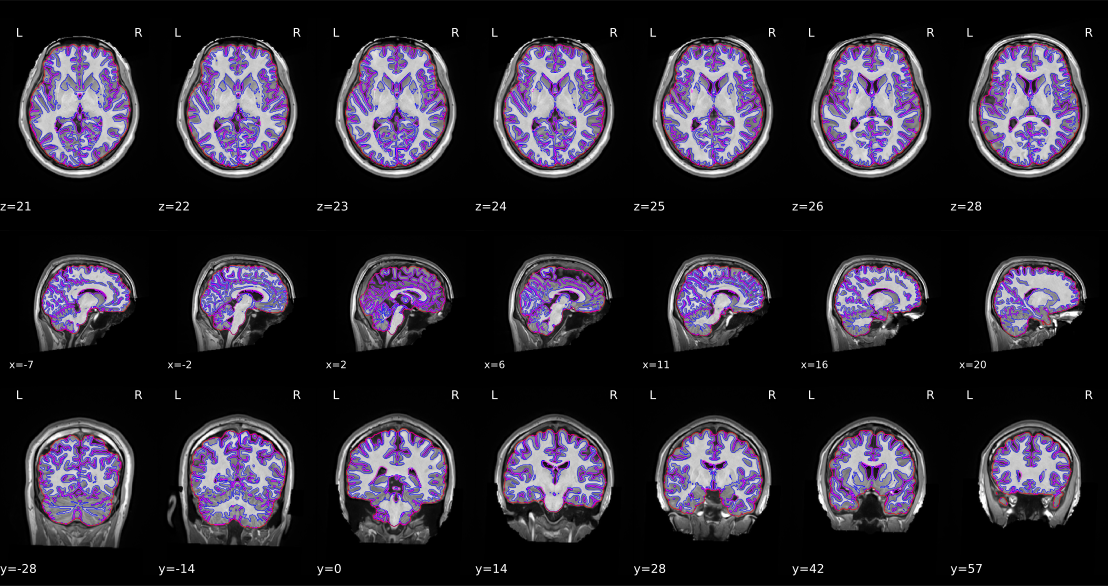
A sample of Brain Mask & Segmentation
2. Spatial Normalization
- Ventricles: Should be aligned between subject and template
- White/grey matter boundaries: Should match
- Check: No stretching or distortion
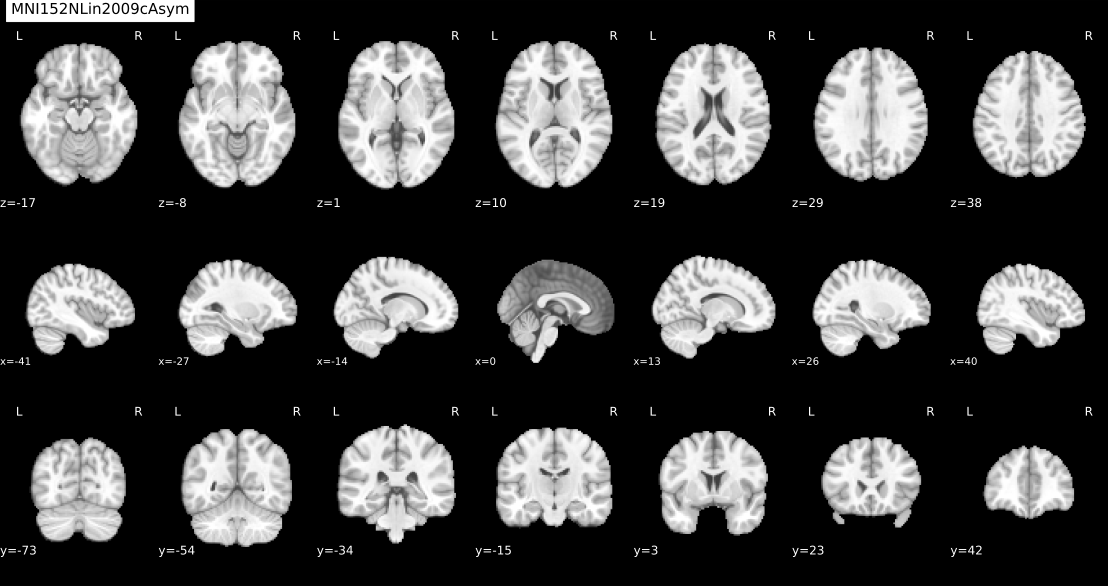
A sample of Spatial Normalization
3. Fieldmap Correction
- Before/after: Compare images before and after correction
- Frontal area: Check distortion correction
- Check: Normal brain shape after correction
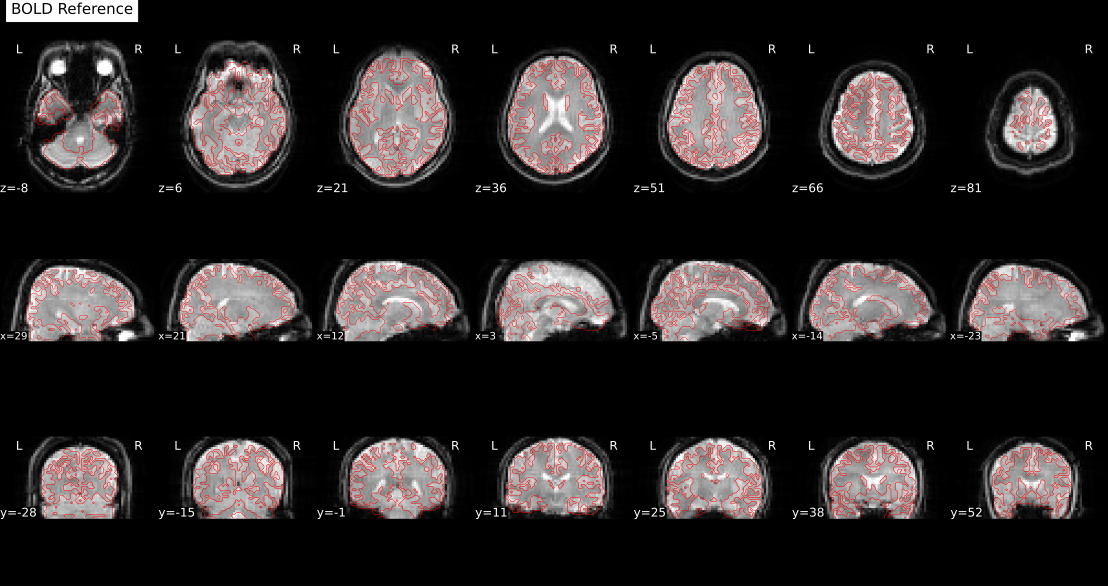
A sample of Fieldmap Correction
4. Functional-Anatomical Alignment
- Red line: Should align with grey/white matter boundary
- Fixed/Moving: No distortion between images
- Check: Proper surface registration
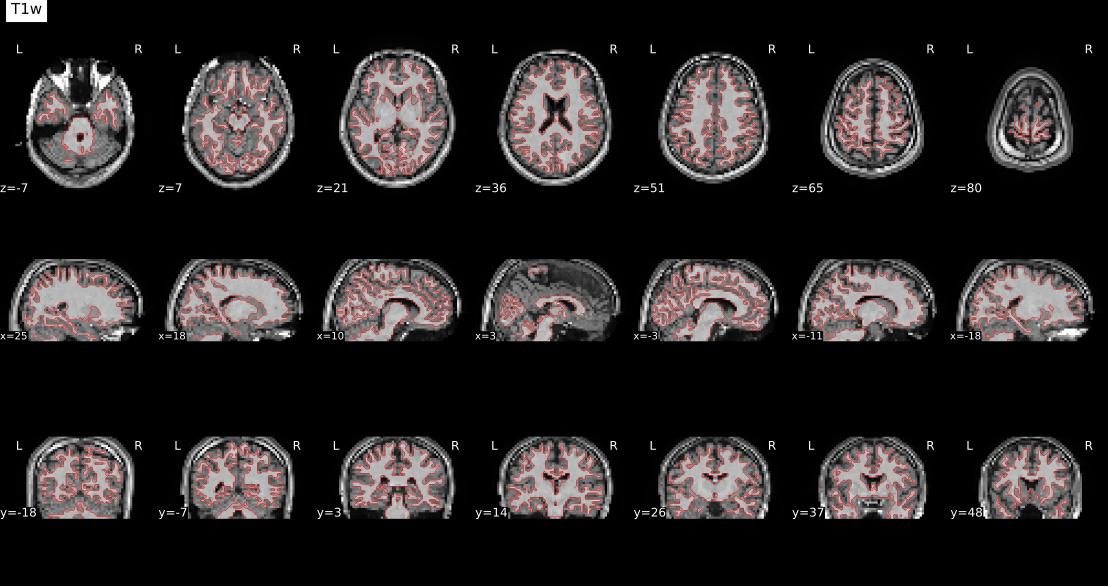
A sample of Functional-Anatomical Alignment
References
- fMRIPrep: Esteban, O., Markiewicz, C. J., Blair, R. W., et al. (2019). fMRIPrep: a robust preprocessing pipeline for functional MRI. Nature Methods, 16(1), 111-116.
- Nilearn: Abraham, A., Pedregosa, F., Eickenberg, M., et al. (2014). Machine learning for neuroimaging with scikit-learn. Frontiers in Neuroinformatics, 8, 14.
- BIDS: Gorgolewski, K. J., Auer, T., Calhoun, V. D., et al. (2016). The brain imaging data structure, a format for organizing and describing outputs of neuroimaging experiments. Scientific Data, 3, 160044.
- QC / Motion Quality Metrics: Power, J. D., Barnes, K. A., Snyder, A. Z., Schlaggar, B. L., & Petersen, S. E. (2012). Spurious but systematic correlations in functional connectivity MRI networks arise from subject motion. NeuroImage, 59(3), 2142–2154.
Quality Control and Exclusion Criteria
We have checked all the items in the code above and reported them in the QC results. However, after preprocessing with fMRIPrep, all outputs must still be carefully reviewed. Always check the fMRIPrep log for the message “fMRIPrep finished successfully!”. Confirm that each scan has an acceptable number of volumes, review the generated QC reports and images, and visually inspect the final outputs for additional verification.
Data with excessive motion or insufficient volumes should be excluded. Typical thresholds include minimum volume counts, mean FD limits, and motion ratios. These thresholds are defined in the QC configuration and can be adjusted depending on dataset requirements. All steps have been carefully performed, and the codes have been made publicly available for transparency and reproducibility.
Authors / Version
- Author: Mohammad H. Abbasi (This email address is being protected from spambots. You need JavaScript enabled to view it.)
- Stanford University, STAI Lab (https://stai.stanford.edu)
- Created: 2025 | Version: 1.0.0 | Last update: September 16, 2025
Acknowledgements
Thanks to the fMRIPrep team, Nilearn contributors, and the broader neuroimaging community
for developing the foundational tools that made this pipeline possible.
Special appreciation to the Stanford Translational AI Lab (STAI Lab) for extending the QC, connectivity,
and pipeline management components.
Sincere thanks to Favour Nerrise and Karan Singh for their valuable feedback, collaboration,
and continuous contributions to improving the pipeline.
How to Cite This Work
If you use this pipeline in your research, please cite it as follows:
Abbasi, M.H., & Adeli, E. (2025). fMRI Processing Pipeline: A lightweight, end-to-end framework for BIDS-compatible fMRI preprocessing and quality control.
Stanford Translational AI Lab, Stanford University. Zenodo.
https://doi.org/10.5281/zenodo.17516604
@software{abbasi2025fmri,
 author = {Mohammad Hassan Abbasi and Ehsan Adeli},
 title = {f{MRI} {P}rocessing {P}ipeline: A lightweight, end-to-end framework for {BIDS}-compatible f{MRI} preprocessing and quality control},
 year = {2025},
 institution = {Stanford Translational AI Lab, Stanford University},
 publisher = {Zenodo},
 doi = {10.5281/zenodo.17516368},
 url = {https://doi.org/10.5281/zenodo.17516604},
 note = {Zenodo, doi: 10.5281/zenodo.17516604},
}
Mind Data Hub
Structural MRI Processing Pipeline

| Prerequisites → Configuration → Processing Steps → Quick Start → Outputs/QC → Authors/Version/Cite |
The Structural MRI (sMRI) Processing Pipeline is a lightweight, end-to-end workflow for structural brain MRI. It performs brain extraction, registration to MNI, and post-processing (N4 bias correction, masked Z-score normalization, cropping), and produces clear QC visualizations plus CSV metadata for downstream analysis. The design is config-driven, scalable across cohorts, and interoperable with common neuroimaging tools and AI pipelines.
- Brain Extraction, SynthStrip (Singularity/Docker/FreeSurfer) with montage QC & volume summary.
- Registration, Rigid → Affine alignment to
MNI152NLin2009cAsym (1mm)using SimpleITK. - Post-processing, Optional N4, masked Z-score, tight cropping with affine update.
- QC & Reports, Per-subject overlays and global QC CSV (PASS/FAIL, volumes, messages).
- Metadata, CSV indices for warped/normalized/cropped outputs (+ optional demographics encodings).
Prerequisites
- Python ≥ 3.8
- Python packages:
numpy,nibabel,SimpleITK,matplotlib,tqdm,templateflow,pandas - SynthStrip via one of:
- Singularity image:
freesurfer/synthstrip:latest(recommended) - Docker image:
freesurfer/synthstrip:latest - FreeSurfer installation with
mri_synthstripin$FREESURFER_HOME/bin
- Singularity image:
- (Optional) TemplateFlow cache (auto-downloads
MNI152NLin2009cAsym) - (Optional) conda for environment management
Example env setup
conda create -y -n smri python=3.10
conda activate smri
pip install numpy nibabel SimpleITK matplotlib tqdm templateflow pandas
Configuration, Key items in config.py
The pipeline is config-driven. Edit config.py once and drive all scripts consistently. Below is a concise map of the most important keys, with usage tips and sensible defaults.
INPUT_DIR: Root directory for input NIfTI files.OUTPUT_DIR: Root for all outputs (skullstrip / registration / postprocess / metadata).LOG_DIR: Log directory (automatically placed insideOUTPUT_DIR).FREESURFER_HOME: Path to FreeSurfer installation directory.SYNTHSTRIP_BIN: Full path tomri_synthstripbinary.SYNTHSTRIP_SIF_PATH: Singularity image path for SynthStrip (if used in container mode).
STRUCTURE: Path pattern template (e.g.,{root}/{subject}/{session}/anat).STAGE_ROOTS: Dictionary with stage-specific output subfolders (e.g.,skullstrip,registration,qc).- Legacy aliases:
FORCE_REPROCESS,QC_DIR,SKULLSTRIP_DIR, etc. are auto-derived.
DATASET_NAME: Name of the dataset being processed (e.g.,"OpenNeuro ds004215").MODALITIES: List of modalities to process (usually["T1w", "T2w"]).SUBJECTS,SESSIONS: Can be set toNoneor a filtered list.FORCE_REPROCESSING: IfTrue, overwrites previous outputs.
CPU_CORES: Number of CPU cores available on the system.ENABLE_PARALLEL: Whether to run stages in parallel.MAX_WORKERS: Number of parallel workers to spawn.
LOG_LEVEL: Logging verbosity (e.g.,"INFO","DEBUG").LOG_FORMAT: Format string for log messages.
SKULLSTRIP_T1_FILE_PATTERN: Pattern to locate T1-weighted input NIfTI files.SKULLSTRIP_T2_FILE_PATTERN: Pattern to locate T2-weighted input NIfTI files.
ENABLE_QC: Whether to enable QC checks.QC_GENERATE_IMAGES: Whether to save image previews for QC.QC_SUMMARY_FILE: Filename of the summary CSV (e.g.,"qc_summary.csv").QC_BRAIN_VOLUME_MIN_ML,QC_BRAIN_VOLUME_MAX_ML: Min/max bounds for acceptable brain volume.DICE_PASS_THRESHOLD: Threshold for Dice overlap between masks.
MNI_TEMPLATE_VERSION: e.g.,"MNI152NLin2009cAsym".MNI_TEMPLATE_RESOLUTION: e.g.,1(for 1mm resolution).
POSTPROCESS_APPLY_N4: Apply N4 bias field correction before normalization.POSTPROCESS_CROP_MARGIN: Crop margin in voxels after Z-score normalization.
GENERATE_CSV_METADATA: Whether to generate output CSV files.CSV_METADATA_DIR: Path to store CSV files.T1_CSV_FILENAME,T2_CSV_FILENAME: Output file names for metadata.PARTICIPANTS_TSV_PATH: Path to BIDSparticipants.tsv.CSV_COLUMNS: Ordered list of fields to appear in the metadata files.T1_PROCESSED_PATTERNS,T2_PROCESSED_PATTERNS: Patterns to locate output files.SEX_ENCODING,HANDEDNESS_ENCODING: Encoding dictionaries.MISSING_DATA_VALUE: Value used for missing entries (e.g.,"n/a").REQUIRE_BOTH_MODALITIES: Whether both T1w and T2w are mandatory.VALIDATE_FILE_EXISTENCE: Whether to check for input/output file presence before processing.
config.py
# ============ GENERAL CONFIGURATION ============
DATASET_NAME = "OpenNeuro ds004215"
INPUT_DIR = "/path/to/REDACTED"
OUTPUT_DIR = "/path/to/REDACTED"
LOG_DIR = os.path.join(OUTPUT_DIR, "logs")
# ============ HARDWARE & PARALLEL ============
CPU_CORES = 64
ENABLE_PARALLEL = True
MAX_WORKERS = 8
# ============ LOGGING ============
LOG_LEVEL = "INFO"
LOG_FORMAT = "%(asctime)s - %(name)s - %(levelname)s - %(message)s"
# ============ FREESURFER ============
FREESURFER_HOME = "/path/to/REDACTED"
SYNTHSTRIP_BIN = os.path.join(FREESURFER_HOME, "bin", "mri_synthstrip")
SYNTHSTRIP_SIF_PATH = "/path/to/REDACTED"
# ============ FILE PATTERNS ============
SKULLSTRIP_T1_FILE_PATTERN = "*acq-MPRAGE_T1w.nii.gz"
SKULLSTRIP_T2_FILE_PATTERN = "*acq-CUBE_T2w.nii.gz"
# ============ PROCESSING SCOPE ============
MODALITIES = ["T1w", "T2w"]
SUBJECTS = None
SESSIONS = None
FORCE_REPROCESSING = True
# ============ QUALITY CONTROL ============
ENABLE_QC = True
QC_GENERATE_IMAGES = True
QC_SUMMARY_FILE = "qc_summary.csv"
QC_BRAIN_VOLUME_MIN_ML = 800
QC_BRAIN_VOLUME_MAX_ML = 2000
DICE_PASS_THRESHOLD = 0.8
# ============ REGISTRATION ============
MNI_TEMPLATE_VERSION = "MNI152NLin2009cAsym"
MNI_TEMPLATE_RESOLUTION = 1
# ============ POSTPROCESS ============
POSTPROCESS_APPLY_N4 = True
POSTPROCESS_CROP_MARGIN = 1
# ============ METADATA ============
GENERATE_CSV_METADATA = True
CSV_METADATA_DIR = os.path.join(OUTPUT_DIR, "metadata")
T1_CSV_FILENAME = "T1_metadata.csv"
T2_CSV_FILENAME = "T2_metadata.csv"
PARTICIPANTS_TSV_PATH = "/path/to/REDACTED"
CSV_COLUMNS = [
 "subjectId", "session", "MNI_Warped", "MNI_ZSCORE",
 "MNI_Z_Cropped", "age", "sex", "handedness"
]
T1_PROCESSED_PATTERNS = {
 "MNI_Warped": "*T1w*_mni_warped.nii.gz",
 "MNI_ZSCORE": "T1w_mni_zscore_fixed.nii.gz",
 "MNI_Z_Cropped": "T1w_mni_zscore_fixed_cropped.nii.gz"
}
T2_PROCESSED_PATTERNS = {
 "MNI_Warped": "*T2w*_mni_warped.nii.gz",
 "MNI_ZSCORE": "T2w_mni_zscore_fixed.nii.gz",
 "MNI_Z_Cropped": "T2w_mni_zscore_fixed_cropped.nii.gz"
}
SEX_ENCODING = {
 "male": 1,
 "female": 2,
 "n/a": 0
}
HANDEDNESS_ENCODING = {
 "right": 1,
 "left": 2,
 "ambidextrous": 3,
 "n/a": 0
}
MISSING_DATA_VALUE = "n/a"
REQUIRE_BOTH_MODALITIES = False
VALIDATE_FILE_EXISTENCE = True
# ============ STRUCTURE ============
STAGE_ROOTS = {
 "skullstrip": os.path.join(OUTPUT_DIR, "skullstrip"),
 "registration": os.path.join(OUTPUT_DIR, "registration"),
 "qc": os.path.join(OUTPUT_DIR, "QC"),
}
STRUCTURE = "{root}/{subject}/{session}/anat"
# Legacy aliases
FORCE_REPROCESS = FORCE_REPROCESSING
QC_DIR = STAGE_ROOTS["qc"]
SKULLSTRIP_DIR = STAGE_ROOTS["skullstrip"]
REGISTRATION_DIR = STAGE_ROOTS["registration"]
POSTPROCESS_MODALITIES = ["T1", "T2"]
POSTPROCESS_SUBJECTS = SUBJECTS
Processing Steps
0) Convert DICOM to NIfTI, dicom_to_nifti.py
If your dataset is already in NIfTI, skip this step. Otherwise, this script converts DICOM folders into gzip-compressed NIfTI (BIDS-style layout) using dcm2niix.
Inputs
- DICOM series or a root directory containing series
Outputs
{subject}/{session}/anat/*.nii.gz(+ JSON sidecars)
CLI
python dicom_to_nifti.py --dicom_dir /path/to/DICOM --output_dir /path/to/nifti --subject sub-0001 --session ses-01
1) Brain Extraction, skullstrip.py
Removes non-brain tissue using SynthStrip. The script attempts Singularity → Docker → FreeSurfer binary (in that order). Generates brain, mask, and QC images.
Inputs
- NIfTI files discovered via
STRUCTUREand patterns:*acq-MPRAGE_T1w.nii.gz*acq-CUBE_T2w.nii.gz
Outputs (per subject/session in STAGE_ROOTS["skullstrip"])
*_brain.nii.gz,*_brain_mask.nii.gz*_desc-qc.pngmontage overlay- Global CSV:
QC/qc_summary.csv(brain volume, PASS/FAIL, paths, message)
CLI
python skullstrip.py # process all
python skullstrip.py --subject sub-ON12345
2) Registration to MNI (Rigid → Affine), reg.py
Registers T1w to MNI152NLin2009cAsym (1mm) with SimpleITK (Mattes MI, multi-resolution), then applies the same transforms to T2w in the same session.
Method
- Rigid: Euler3D, shrink [4,2,1], linear
- Affine: 12-DOF, shrink [2,1], linear
- Final resampling: composite transform (rigid+affine) for single interpolation
- Saves
*.mattransforms
Outputs (per subject/session in STAGE_ROOTS["registration"])
*_mni_rigid_warped.nii.gz(QC/ref)*_mni_warped.nii.gz(final)other/*_rigid.mat,other/*_affine.mat
CLI
python reg.py
python reg.py --subject sub-ON12345
3) Post-processing, postprocess_mni_mask_zscore_crop.py
Warp masks to MNI, run optional N4 bias correction, compute masked Z-score, crop tightly around the brain, and save a multi-slice visualization.
Steps
- Warp native masks → MNI with nearest-neighbor using the composite transform.
- N4 bias correction (if
POSTPROCESS_APPLY_N4 = True). - Masked Z-score: μ/σ computed within mask; background set to 0.
- Crop: tight bounding box (+
POSTPROCESS_CROP_MARGIN), affine updated (qform/sform set). - Save multi-slice PNG montage.
Outputs (per subject/session; under the same registration anat/)
T1w_mni_mask.nii.gzT1w_mni_warped_n4.nii.gz(if N4 enabled)T1w_mni_zscore_fixed.nii.gzT1w_mni_zscore_fixed_cropped.nii.gzmultislice_visualization_<subj>.png- (T2 equivalents when available; falls back to T1 mask if T2 mask missing)
CLI
python postprocess_mni_mask_zscore_crop.py
python postprocess_mni_mask_zscore_crop.py --subject sub-ON12345
4) Quality Control & Reports, skullstrip.py, structural_qc.py
skullstrip.pywrites per-subject QC montages and a global QC CSV with brain volume and status.structural_qc.py(optional helpers) can support extended validations (e.g., Dice vs reference) if needed.
QC CSV Columns
input_file,output_file,modality,qc_status,brain_volume_ml,qc_image_path,error_message
5) CSV Metadata, generate_csv_metadata.py
Scans registration outputs and builds CSVs listing MNI warped, Z-score, and cropped paths, with optional demographics (participants.tsv) and encodings (sex, handedness).
Outputs
metadata/T1_metadata.csvmetadata/T2_metadata.csv
CLI
python generate_csv_metadata.py
Quick Start
Show commands# 0) (optional) environment conda create -y -n smri python=3.10 conda activate smri pip install numpy nibabel SimpleITK matplotlib tqdm templateflow pandas # 1) configure # edit config.py (private paths, thresholds) # 2) brain extraction python skullstrip.py # 3) registration python reg.py # 4) post-process python postprocess_mni_mask_zscore_crop.py # 5) metadata tables python generate_csv_metadata.py
Outputs (Where to Find Things)
- Skullstrip →
STAGE_ROOTS["skullstrip"]*_brain.nii.gz,*_brain_mask.nii.gz,*_desc-qc.png, globalQC/qc_summary.csv - Registration →
STAGE_ROOTS["registration"]*_mni_rigid_warped.nii.gz,*_mni_warped.nii.gz,other/*_rigid.mat,other/*_affine.mat - Post-process → same
anat/underregistrationT1w_mni_mask.nii.gz,T1w_mni_zscore_fixed.nii.gz,T1w_mni_zscore_fixed_cropped.nii.gz,multislice_visualization_<subj>.png(and T2 analogs) - CSV metadata →
CSV_METADATA_DIRT1_metadata.csv,T2_metadata.csv
Best Practices
- Keep
config.pyunder version control; avoid hardcoding private paths in scripts. - Use Singularity/Docker for SynthStrip consistency across systems.
- Visually inspect outliers flagged by QC (extreme brain volumes, failed masks/registration).
- Pin TemplateFlow template (
MNI152NLin2009cAsym, 1mm) to ensure reproducibility. - Log CPU threads and memory; large cohorts benefit from batched runs.
Troubleshooting
- SynthStrip not found: ensure one of Singularity/Docker/FreeSurfer is available in PATH; try
freesurfer/synthstrip:latest. - Strange intensity after N4: disable N4 (
POSTPROCESS_APPLY_N4 = False) and compare before/after Z-score. - Registration misalignment: check
*_mni_rigid_warped.nii.gzoverlay; verify correct template resolution. - CSV empty: confirm
STRUCTUREand file patterns inconfig.pymatch your dataset.
Authors / Version
- Author: Mohammad H. Abbasi (mabbasi [at] stanford.edu)
- Lab: Stanford University, STAI Lab (https://stai.stanford.edu)
- Created: 2025 | Version: 1.0.0 | Last update: Sep 18, 2025
Acknowledgements
Thanks to the open-source neuroimaging community (FreeSurfer/SynthStrip, TemplateFlow, SimpleITK, nibabel) and dataset providers.
How to Cite This Work
If you use this pipeline in your research, please cite it as follows:
Abbasi, M.H., & Adeli, E. (2025). sMRI Processing Pipeline: A lightweight, end-to-end framework for BIDS-compatible structural MRI preprocessing and quality control.
Stanford Translational AI Lab, Stanford University. Zenodo.
https://doi.org/10.5281/zenodo.17503175
@software{abbasi2025smri,
 author = {Mohammad Hassan Abbasi and Ehsan Adeli},
 title = {s{MRI} {P}rocessing {P}ipeline: A lightweight, end-to-end workflow for structural brain {MRI} preprocessing and quality control},
 year = {2025},
 institution = {Stanford Translational AI Lab, Stanford University},
 publisher = {Zenodo},
 doi = {10.5281/zenodo.17503175},
 url = {https://doi.org/10.5281/zenodo.17503175},
 note = {Zenodo, doi: 10.5281/zenodo.17503175},
 }
---
Mind Data Hub
Diffusion Tensor Imaging (DTI) Pre-Processing Pipeline

| Prerequisites → Configuration → Processing Steps → Quick Start → Outputs/QC → Authors/Version/Cite |
The Diffusion MRI (DTI) Pre-Processing Pipeline is a lightweight, end-to-end workflow for diffusion brain MRI. It performs susceptibility correction (TOPUP), eddy current & motion correction (EDDY), within-session alignment/merge, registration to MNI, and diffusion tensor fitting (DIPY). The pipeline generates clear QC visualizations and summary tables (CSV/JSON/HTML) for downstream analysis. The design is config-driven, scalable across cohorts, and interoperable with common neuroimaging tools and AI pipelines.
- Distortion & Motion, FSL TOPUP (AP/PA) + EDDY with slice-to-volume (S2V) and outlier replacement (REPOL).
- Brain Extraction, FSL BET with montage QC and brain-volume range checks.
- Registration, FLIRT rigid (6 DOF) → affine (12 DOF) to MNI (trilinear for images, nearest-neighbour for masks).
- Gradient Handling, b-vector rotation synchronized with all applied transforms.
- Tensor Fitting, DIPY (WLS/OLS) producing FA, MD, RD, AD, eigenvectors, and tensor components.
- QC & Reports, Per-step PNG overlays, per-subject CSV/JSON, and an aggregated HTML summary.
- Metadata, CSV indices for corrected/registered outputs, and tensor maps for downstream modeling.
Prerequisites
-
Python ≥ 3.8
-
Python packages:
numpy,nibabel,dipy,matplotlib,tqdm,pandas -
FSL ≥ 6.0 (for TOPUP, EDDY, BET, FLIRT)
-
ANTs
- DIPY
Configuration, Key items in config.py (DTI)
This pipeline is config-driven. Edit config.py once and reuse across all scripts (b0_correction.py, process_eddy.py, brain_extraction.py, run_reg_mni.py, run_dtifit_dipy.py, run_final_qc.py, dti_qc.py).
FSL_HOME,FSL_BIN,FSL_ENV,core FSL paths and env vars.setup_fsl_env(),helper to source FSL config into the current process.
DATASET_NAME, e.g.,"OpenNeuro ds004215"INPUT_DIR,INPUT_SUBDIR,OUTPUT_DIR,TEMP_DIR,QC_DIRNUM_SCANS_PER_SESSION,number of DWI runs per session- Logging:
ENABLE_DETAILED_LOGGING,LOG_DIR,LOG_LEVEL,LOG_FORMAT - Processing toggles:
DICOM_TO_NIFTY,FORCE_REPROCESS
B0_CORRECTION_FOLDER,B0_CORRECTION("Topup"|"Fieldmap"|None)- Input patterns:
DWI_FILE_PATTERNS,BVAL_FILE_PATTERNS,BVEC_FILE_PATTERNS,JSON_FILE_PATTERNS - Reversed polarity:
REVERSED_DWI_FILE_PATTERNS,REVERSED_BVAL_FILE_PATTERNS,REVERSED_BVEC_FILE_PATTERNS,REVERSED_JSON_FILE_PATTERNS B0_CORRECTION_QC_SLICES,slice indices for B0 QC
SKULL_STRIP_INPUT_FOLDER,SKULL_STRIP_OUTPUT_FOLDERSKULL_STRIP_INPUT_NAMES,SKULL_STRIP_OUTPUT_PATTERNFRACTIONAL_INTENSITY,BET threshold (default 0.4)- QC:
ENABLE_QC,QC_GENERATE_IMAGES,QC_SUMMARY_FILE,QC_BRAIN_VOLUME_MIN_ML/QC_BRAIN_VOLUME_MAX_ML(800–2000) - QC visuals:
QC_IMAGE_DPI,QC_IMAGE_FORMAT,QC_SLICE_VIEWS,QC_SLICE_NUMBERS
EDDY_CORRECTION_FOLDERSLICE_TO_SLICE_CORRECTION,enable slice-to-slice correctionBASELINE_SLICE_ORDER_JSON,fallback template if JSON lacks slice orderEDDY_CORRECTION_QC_SLICES
TEMPLATE_PATH,e.g.,tpl-MNI152NLin2009cAsym_res-01_desc-brain_T1w.nii.gz- Inputs:
REG_MNI_MASK_INPUT_FOLDER,REG_MNI_MASK_NAMES,REG_MNI_B0_INPUT_FOLDER,REG_MNI_B0_INPUT_NAMES,REG_MNI_INPUT_FOLDER,REG_MNI_INPUT_NAMES,REG_MNI_BVEC_INPUT_NAMES,REG_MNI_BVAL_INPUT_NAMES - Outputs:
REG_MNI_OUTPUT_FOLDER,REG_MNI_OUTPUT_PATTERN - QC:
MODALITY_PATTERNS,e.g.,{"Diffusion": ["b0_reg*", "mask_bet_scan0_mask*"]}
MASK_PATH,MASK_NAMEDTIFIT_INPUT_FOLDER,DTIFIT_DWI_INPUT_NAME,DTIFIT_BVEC_INPUT_NAME,DTIFIT_BVAL_INPUT_NAMEDTIFIT_OUT_FOLDER,DTIFIT_QC_SLICES
config.py (DTI, v1.0.0)
# !/usr/bin/env python
# -*- coding: utf-8 -*-
"""
Configuration file for neuroimaging pipeline
Contains settings for:
1. Common configurations (paths, logging, etc.)
2. Topup and Eddy correction
3. Skull stripping
4. DTI fit
5. Registration
Authors:
- Mohammad H Abbasi (mabbasi [at] stanford.edu)
- Gustavo Chau (gchau [at] stanford.edu)
Stanford University
Created: 2025
Version: 1.0.0
"""
import os
import multiprocessing
import subprocess
###############################################################################
# FSL Settings #
###############################################################################
FSL_HOME = "/path/u/user/fsl"
FSL_BIN = os.path.join(FSL_HOME,'share/fsl/bin')
# FreeSurfer environment variables
FSL_ENV = {
 "FSLOUTPUTTYPE": "NIFTI_GZ",
 "FSLDIR": FSL_HOME
}
def setup_fsl_env():
 """
 Set up FreeSurfer environment variables in the current Python process
 """
 os.environ.update(FSL_ENV)
 os.system(f". {FSL_HOME}/etc/fslconf/fsl.sh")
###############################################################################
# Common/Shared Settings #
###############################################################################
DATASET_NAME = "OpenNeuro ds004215"
INPUT_DIR = "/input/path"
INPUT_SUBDIR = ""
OUTPUT_DIR = "/output/path"
TEMP_DIR = "tmp"
QC_DIR = os.path.join(OUTPUT_DIR, "QC")
NUM_SCANS_PER_SESSION = 1
# Logging settings
ENABLE_DETAILED_LOGGING = True
LOG_DIR = "/logs/path"
LOG_LEVEL = "DEBUG" # DEBUG, INFO, WARNING, ERROR, CRITICAL
LOG_FORMAT = '%(asctime)s - %(name)s - %(levelname)s - %(message)s' if ENABLE_DETAILED_LOGGING else '%(message)s'
# Processing settings
DICOM_TO_NIFTY = False
FORCE_REPROCESS = False
###############################################################################
# B0 field correction settings #
###############################################################################
B0_CORRECTION_FOLDER = os.path.join(OUTPUT_DIR, "B0_correction")
B0_CORRECTION = 'Topup' # Topup, Fieldmap or None
# File patterns for input files. Length of lists should match NUM_SCANS_PER_SESSION
DWI_FILE_PATTERNS = ['*dMRI_PA.nii']
BVAL_FILE_PATTERNS = ['*dMRI_PA.bval']
BVEC_FILE_PATTERNS = ['*dMRI_PA.bvec']
JSON_FILE_PATTERNS = ['*dMRI_PA.json']
# File patterns for Reversed polarity input files. Length of lists should match NUM_SCANS_PER_SESSION
REVERSED_DWI_FILE_PATTERNS = ['*dMRI_AP.nii']
REVERSED_BVAL_FILE_PATTERNS = ['*dMRI_AP.bval']
REVERSED_BVEC_FILE_PATTERNS = ['*dMRI_AP.bvec']
REVERSED_JSON_FILE_PATTERNS = ['*dMRI_AP.json']
B0_CORRECTION_QC_SLICES = [17,40]
###############################################################################
# Skull Stripping Settings #
###############################################################################
SKULL_STRIP_INPUT_FOLDER = B0_CORRECTION_FOLDER
SKULL_STRIP_OUTPUT_FOLDER = os.path.join(OUTPUT_DIR, "Skull_stripping")
SKULL_STRIP_INPUT_NAMES = None # if None, assume output of Topup
SKULL_STRIP_OUTPUT_PATTERN = None # if None, use "mask_bet_scan{scan_num}"
FRACTIONAL_INTENSITY = 0.4 # 0..1 (smaller => larger brain outline)
# Skull Stripping QC
ENABLE_QC = True
QC_GENERATE_IMAGES= True
QC_SUMMARY_FILE = "qc_summary.csv"
QC_BRAIN_VOLUME_MIN_ML = 800
QC_BRAIN_VOLUME_MAX_ML = 2000
QC_IMAGE_DPI = 150
QC_IMAGE_FORMAT = "png"
QC_SLICE_VIEWS = ["axial", "sagittal", "coronal"]
QC_SLICE_NUMBERS= {"axial": None, "sagittal": None, "coronal": None}
###############################################################################
# Eddy correction settings #
###############################################################################
EDDY_CORRECTION_FOLDER = os.path.join(OUTPUT_DIR, "Eddy_correction")
SLICE_TO_SLICE_CORRECTION= True
BASELINE_SLICE_ORDER_JSON= None # template if json lacks info
EDDY_CORRECTION_QC_SLICES= [17,40]
###############################################################################
# Registration to MNI #
###############################################################################
TEMPLATE_PATH = "/path/u/user/tpl-MNI152NLin2009cAsym_res-01_desc-brain_T1w.nii.gz"
REG_MNI_MASK_INPUT_FOLDER = SKULL_STRIP_OUTPUT_FOLDER
REG_MNI_MASK_NAMES = 'mask_bet_scan0_mask.nii.gz'
REG_MNI_B0_INPUT_FOLDER = SKULL_STRIP_OUTPUT_FOLDER
REG_MNI_B0_INPUT_NAMES = 'mask_bet_scan0.nii.gz' # or None
REG_MNI_INPUT_FOLDER = EDDY_CORRECTION_FOLDER
REG_MNI_INPUT_NAMES = 'eddy_aligned_0.nii.gz'
REG_MNI_BVEC_INPUT_NAMES = 'eddy_aligned_0.eddy_rotated_bvecs'
REG_MNI_BVAL_INPUT_NAMES = 'dwi_merged_0.bval'
REG_MNI_OUTPUT_FOLDER = os.path.join(OUTPUT_DIR, "Reg_MNI")
REG_MNI_OUTPUT_PATTERN = None # default "merged_dwi"
# QC thresholds/patterns
MODALITY_PATTERNS = {'Diffusion':['b0_reg*','mask_bet_scan0_mask*']}
###############################################################################
# DTIFIT using Dipy #
###############################################################################
MASK_PATH = REG_MNI_OUTPUT_FOLDER
DTIFIT_INPUT_FOLDER = REG_MNI_OUTPUT_FOLDER
DTIFIT_DWI_INPUT_NAME = None # or explicit file name
DTIFIT_BVEC_INPUT_NAME = None
DTIFIT_BVAL_INPUT_NAME = None
MASK_NAME = None # or explicit mask name
DTIFIT_OUT_FOLDER = os.path.join(OUTPUT_DIR, "Dtifit")
DTIFIT_QC_SLICES = [75,90]
Processing Steps
1) Topup Correction, b0_correction.py
Correct susceptibility-induced distortions using FSL TOPUP (Andersson et al., 2003). This step estimates a field map from images with opposite phase-encoding directions and applies it to unwarp distorted diffusion volumes.

Reference: Andersson, J.L.R., Skare, S., & Ashburner, J. (2003). NeuroImage, 20(2), 870–888.
https://pubmed.ncbi.nlm.nih.gov/14568458/
2) Eddy Current and Motion Correction, process_eddy.py
Correct distortions caused by eddy currents and subject motion using FSL EDDY (Andersson & Sotiropoulos, 2016). Includes slice-to-volume (S2V) correction and outlier replacement (REPOL).

Steps performed:
- Load and merge diffusion-weighted images (AP/PA or reversed polarity)
- Prepare acquisition parameters and B0 indices
- Run FSL EDDY with slice-to-volume correction (optional)
- Generate QC images comparing original vs corrected volumes
Reference: Andersson, J.L.R., & Sotiropoulos, S.N. (2016). NeuroImage, 125, 1063–1078.
https://pubmed.ncbi.nlm.nih.gov/26481672/
3) Brain Extraction, brain_extraction.py
Removes non-brain tissue from diffusion MRI data using FSL BET (Smith, 2002). This step performs skull stripping and generates quality control (QC) images and summary files to validate the extracted brain.

Steps performed:
- Apply FSL BET to remove non-brain tissue
- Generate brain mask and masked output
- Compute brain volume (ml) and validate against the expected range
- Create QC images (raw, brain-extracted, raw+mask, differences)
- Write QC summary (CSV) for downstream review
Reference: Smith, S.M. (2002). Human Brain Mapping, 17(3), 143–155.
https://pubmed.ncbi.nlm.nih.gov/12391568/
4) Within-session registration & merge, reg_within_fsl.py
Aligns and merges multiple diffusion MRI runs using FSL FLIRT in case a session is broken down into multiple acquisitions. Rigid transformations are estimated between B0 reference images, applied to corresponding diffusion volumes, and propagated to b-vectors to ensure orientation consistency across runs.
Steps performed:
- Register B0 images between runs using FLIRT rigid-body transform
- Apply transforms to diffusion volumes (DWI)
- Rotate b-vectors using the computed transformation matrix
- Merge registered DWI volumes, b-vectors, and b-values
- Save combined outputs for downstream processing
5) Registration to MNI Space, run_reg_mni.py
Registers diffusion images to the MNI152 template using a two-step approach with FSL FLIRT (rigid + affine). Corresponding b-vectors are rotated to preserve orientation consistency. The pipeline also applies the transforms to the diffusion volumes and masks, and prepares final outputs for downstream analysis.
Steps performed:
- Register B0 to MNI (rigid, 6 DOF), save the matrix and registered B0
- Refine B0→MNI with affine (12 DOF), save matrix, and registered B0
- Apply rigid and then affine transforms to DWI
- Rotate b-vectors using the previously computed transformations
- Copy b-values (
bval_final.bval) for consistency - Register mask with nearest-neighbour interpolation using the previously computed transformations
6) Diffusion Tensor Model Fitting, run_dtifit_dipy.py
Fits a diffusion tensor model using DIPY (Garyfallidis et al., 2014). This script takes preprocessed diffusion MRI data (DWI, bvec, bval, mask) and outputs standard DTI-derived measures including fractional anisotropy (FA), mean diffusivity (MD), radial diffusivity (RD), and axial diffusivity (AD). Eigenvectors of the tensor are also saved for visualization.

Steps performed:
- Load diffusion MRI data, b-values, b-vectors, and brain mask
- Construct gradient table using DIPY
- Fit the diffusion tensor model voxel-wise
- Extract tensor components (Dxx, Dxy, Dxz, Dyy, Dyz, Dzz)
- Save DTI-derived tensor components and maps: FA, MD, RD, AD, and eigenvectors (V1, V2, V3)
- Generate QC images showing a color FA map
References:
- Basser, P.J., Mattiello, J., & LeBihan, D. (1994). MR diffusion tensor spectroscopy and imaging. Biophysical Journal, 66(1), 259–267.
https://pubmed.ncbi.nlm.nih.gov/8130344/ - Garyfallidis, E., Brett, M., Correia, M.M., Williams, G.B., & Nimmo-Smith, I. (2014). DIPY, a library for the analysis of diffusion MRI data. Frontiers in Neuroinformatics, 8, 8.
https://pmc.ncbi.nlm.nih.gov/articles/PMC3931231/
7) Quality Control of Final Outputs, run_final_qc.py
Performs automated, session-aware QC checks on diffusion pipeline outputs. This script validates file existence and assesses registration quality using overlap metrics (Dice) between warped images and the MNI template. Results are written to per-session CSV reports for downstream review.


What it checks:
- File existence validation (key outputs, matrices, QC images)
- Registration to MNI (rigid + affine), Dice coefficient vs. MNI template
- Within-session registration (if
NUM_SCANS_PER_SESSION > 1) Dice on b0-to-b0 - Session discovery and per-session reporting
- Structured logging to file + console
Outputs (CSV per subject/session) (filenames as written by the current code):
QC/file_existance.csvQC/within_subject_registraction_qc.csv(only ifNUM_SCANS_PER_SESSION > 1)QC/mni_registraction_qc.csv
Notes: Uses thresholds for PASS/WARNING based on Dice (configurable in code). Relies on TEMPLATE_PATH and derivative folders from config.py. Designed to run after registration steps have completed.
Reference: Zou, K.H., Warfield, S.K., Bharatha, A., Tempany, C.M., Kaus, M.R., Haker, S.J., Wells, W.M., Jolesz, F.A., & Kikinis, R. (2004), 11(2), 178–189.
https://pubmed.ncbi.nlm.nih.gov/14974593/
8) Generation of HTML QC Reports, dti_qc.py
Generates automated, subject-level QC reports that summarize and visualize the outputs of the DTI preprocessing pipeline. This script reads existing QC CSVs and QC images from each step and compiles them into a clickable HTML report along with CSV/JSON summaries. If FA/MD maps are available, it also computes basic statistics.
Summarized in the report:
- Raw vs. corrected B0 (Topup), QC images (before/after)
- Eddy-corrected vs. uncorrected volumes, QC images
- Brain extraction evaluation, mask overlays + brain volume (mL)
- FA and color-FA maps, quick-look thumbnails and stats
- Registration metrics, Dice coefficients for within-session & MNI steps
Inputs (read-only) (filenames as written by the current code):
- Existing QC CSVs (e.g.,
file_existance.csv,within_subject_registraction_qc.csv,mni_registraction_qc.csv) - QC images from each step (Topup, Skull stripping, Eddy, DTI fit)
- Optional DTI maps:
dipy_fa.nii.gz,dipy_md.nii.gz - Paths and flags from
config.py(e.g.,OUTPUT_DIR,NUM_SCANS_PER_SESSION)
Outputs:
- Per-subject JSON:
<QC>/<subject_id>/<subject_id>_qc_results.json - Per-subject CSV:
<QC>/<subject_id>/<subject_id>_qc_summary.csv - Per-subject HTML:
<QC>/<subject_id>/<subject_id>_report.html - Aggregated CSV:
<QC>/all_subjects_summary.csv - Aggregated HTML:
<QC>/DTI_QC_Summary.html
Behavior & notes: Session-aware; read-only summarization; safely skips visualization if nilearn is missing; uses non-interactive Matplotlib backend (Agg).
Reference: Dice for overlap validation: Zou, K.H., et al. (2004). Academic Radiology, 11(2), 178–189.
https://pubmed.ncbi.nlm.nih.gov/14974593/
9) Utility Functions, utilities.py
Provides supporting functions used across the diffusion MRI preprocessing pipeline.
Key functionalities:
- Session Detection, automatically identifies session folders (e.g., YYYY-MM-DD).
- File Search & Matching, robust pattern matching to locate NIfTI, bvec/bval, and transform files even when filenames differ slightly.
- NIfTI Handling, inspects image dimensions and trims odd dimensions to ensure compatibility with FSL/ANTs.
- QC Image Generation, creates slice-wise PNG snapshots for quick quality checks.
- Logging Utilities initializes console and file logging with safe fallbacks if write access is restricted.
Quick Start
1) Edit configuration
- Update paths and file patterns in
config.pyto point to your dataset. - Set
NUM_SCANS_PER_SESSIONaccording to your acquisitions.
2) Prepare subject list
Create a text file named subject_list.txt with one subject ID per line, e.g.:
- sub-0001
- sub-0002
- sub-0003
3) Run preprocessing
Submit array jobs (replace N with the number of subjects in your list):
sbatch --array=1-N run_b0_correction.shPipeline order (per subject)
python b0_correction.py <subject_id>
python process_eddy.py <subject_id>
python brain_extraction.py <subject_id>
python reg_within_fsl.py <subject_id>
python run_reg_mni.py <subject_id>
python run_dtifit_dipy.py <subject_id>
python run_final_qc.py <subject_id>
python dti_qc.py <subject_id>
Check outputs
- Preprocessed data →
<OUTPUT_DIR>(set inconfig.py) - QC results →
<OUTPUT_DIR>/QC/ - Open
<OUTPUT_DIR>/QC/DTI_QC_Summary.htmlfor an overview across all subjects - Lab: Stanford University, STAI Lab (https://stai.stanford.edu)
- Created: 2025 | Version: 1.0.2 | Last update: 10 Sep, 2025
Authors / Version
- Author: Mohammad H. Abbasi (mabbasi [at] stanford.edu), Gustavo Chau (gchau [at] stanford.edu)
- Lab: Stanford University, STAI Lab (https://stai.stanford.edu)
- Created: 2025 | Version: 1.0.2 | Last update: 10 Sep, 2025
How to Cite This Work
If you use this pipeline in your research, please cite it as follows:
Abbasi, M.H., Chau, G., & Adeli, E (2025). DTI Processing Pipeline: A reproducible framework for diffusion MRI preprocessing, tensor fitting, and quality control.
Stanford Translational AI Lab, Stanford University. Zenodo.
https://doi.org/10.5281/zenodo.17503171
@software{abbasi2025dti,
 author = {MohammadHassan Abbasi, Ehsan Adeli, and Gustavo Chau},
 title = {{DTI} {P}rocessing {P}ipeline: A reproducible framework for diffusion {MRI} preprocessing and quality control},
 year = {2025},
 institution = {Stanford Translational AI Lab, Stanford University},
 publisher = {Zenodo},
 doi = {10.5281/zenodo.17503171},
 url = {https://doi.org/10.5281/zenodo.17503171},
 note = {Zenodo, doi: 10.5281/zenodo.17503171},
 }
Mind Data Hub
Quality control metrics and reports
We apply a rigorous Quality Control (QC) process across all modalities to ensure that the imaging data is accurate, consistent, and ready for downstream analysis. QC is performed at multiple stages of preprocessing, and results are documented in both numerical metrics and visual reports.
An automated HTML QC report is generated for all modalities, structural MRI (sMRI), functional MRI (fMRI), and diffusion MRI (DTI), providing a standardized and accessible summary of quality metrics and visual inspections for each subject.
Mind Data HubLinks to open-source scripts on GitHub
We provide open-source preprocessing and quality control scripts for three major neuroimaging modalities. These tools are designed to standardize workflows, ensure reproducibility, and support downstream analysis.
🧠 Structural MRI (sMRI)
Repository: stanfordtailab/smri
🧠 Functional MRI (fMRI)
Repository: stanfordtailab/Fmri
🧠Diffusion Tensor Imaging (DTI)
Repository: stanfordtailab/DTI
Mind Data HubHarmonization procedures
We aim to establish comprehensive harmonization procedures.
This process involves multiple steps. The first step ensures that all outputs follow a consistent format and are integrated into a unified structure, currently completed for the T1 and T2 modalities across the available datasets.
In the next steps, our goal is to harmonize data across different scan types and other relevant factors. Additional details will be provided soon.
Preprocessing steps
📂 Structural MRI (T1-weighted & T2-weighted)
Preprocessing Steps (summary):
-
Convert to NIfTI – Convert input files to NIfTI format if needed
-
Brain Extraction – Remove non-brain tissue
-
Registration to MNI Space (ANTs: Rigid + Affine) – Align images to the standard MNI template
-
Quality Control (QC) – Automated scoring + visual spot checks
-
Best Scan Selection (SynthSeg) – If multiple scans exist in a session, the highest-quality scan is chosen based on SynthSeg scores
Outputs:
-
MNI-aligned images (T1/T2)
-
Z-score normalized and cropped versions
-
Metadata file with QC scores and best scan flag
📂 Functional MRI (Resting-state fMRI)
Preprocessing Steps (fMRIPrep):
-
BIDS + NIfTI – Organize into BIDS and/or NIfTI format
-
Slice-Timing & Motion Correction – Correct acquisition timing and motion artifacts
-
Normalization to MNI – Spatial normalization to the MNI template
-
Denoising & Smoothing – Apply nuisance regression/filters and smoothing
-
QC & Time-Series Extraction – Generate QC reports and extract ROI-based time series (parcellation)
Outputs:
-
MNI-space fMRIPrep derivatives
-
ROI time series + connectivity matrices (if enabled)
-
QC reports (motion, outliers, quality summaries)
📂 Diffusion Tensor Imaging (DTI)
Preprocessing Steps:
-
DICOM → NIfTI
-
Topup (FSL) – Correct field distortions (if AP/PA available)
-
Eddy (FSL) – Correct motion and eddy currents
-
Brain Extraction (BET) – Remove non-brain tissue
-
Merge Acquisitions – Combine split-session scans if applicable
-
DTI Model Fitting (DTIFIT) – Compute FA, MD, RD, AD maps
-
Registration to MNI (ANTs: Rigid + Affine)
-
QC – Motion metrics, gradient coverage, error maps
Outputs:
-
DTI maps (FA/MD/RD/AD) in native and/or MNI space
-
Masks, model parameters, and QC reports
Additional Notes
-
All intermediate steps are saved for each modality.
-
A flowchart is available for all pipelines. For example, DTI:

- 1
- 2
- 3